Training for Virtual Case Management
This training will guide you through everything you need to know about the My New House Virtual Case Manager role, which provides client support and case management services remotely via phone or Google Meet. The training covers how to conduct intakes, assess client needs, coordinate resources, document services, and complete follow-ups while maintaining confidentiality, accuracy, and timely communication.

❋
*
❋ *
Before your first virtual meeting with a client
Before Your First Day of Volunteering:
You will:
Receive access to a My New House email account
Create an LAHD account (you will create one yourself and add My New House as the organization you serve as a housing advocate)
Create a BenefitsCal account (you will receive an email from BenefitsCal with an activation link)
Receive access to the low-income housing database
All required links and instructions will be provided by My New House.
Meanwhile, client schedules meeting time through our website
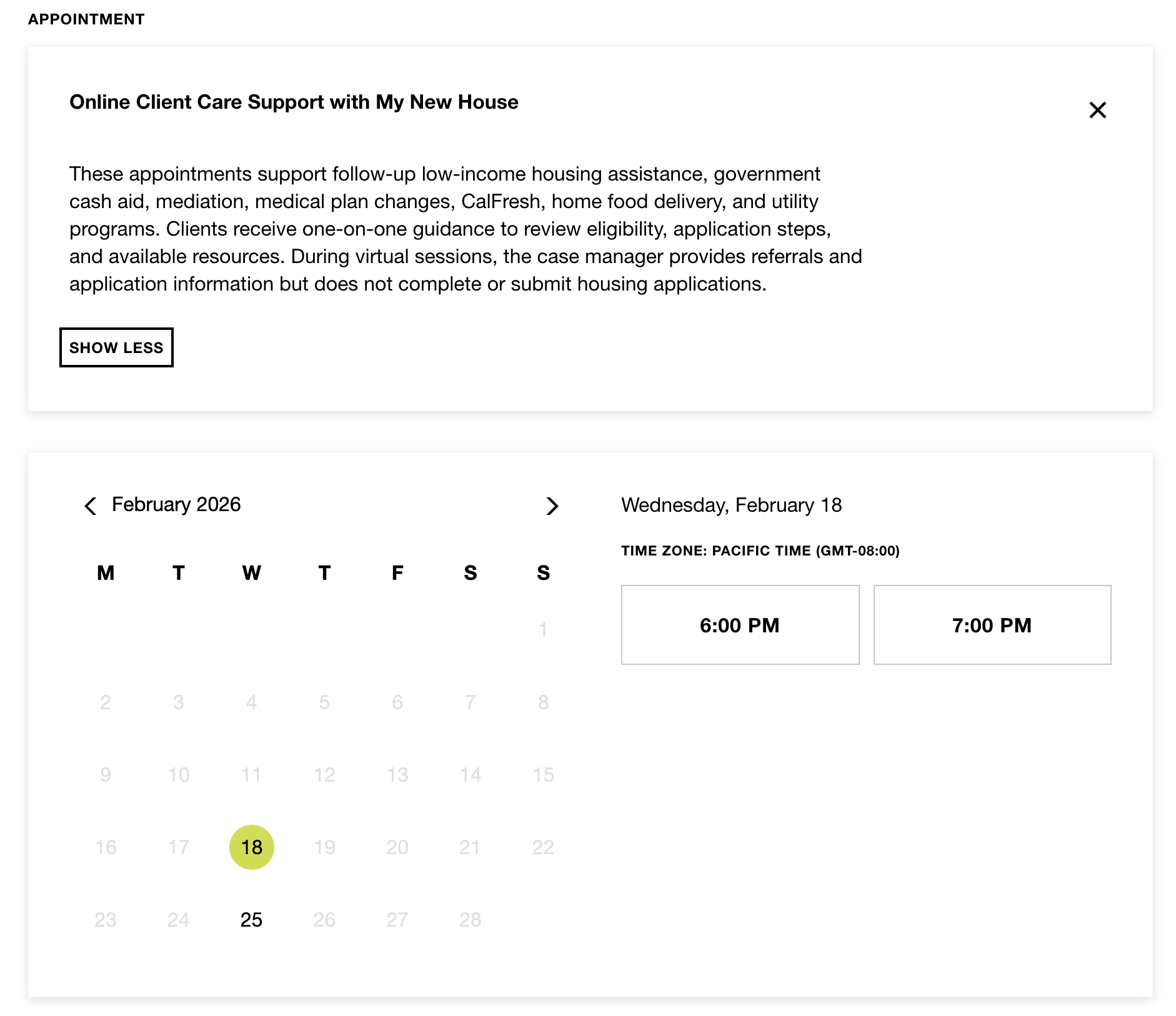
The case manager must provide monthly availability to Gaby to ensure proper scheduling and continuity of client appointments.
Client completes intake form and provides documentation.
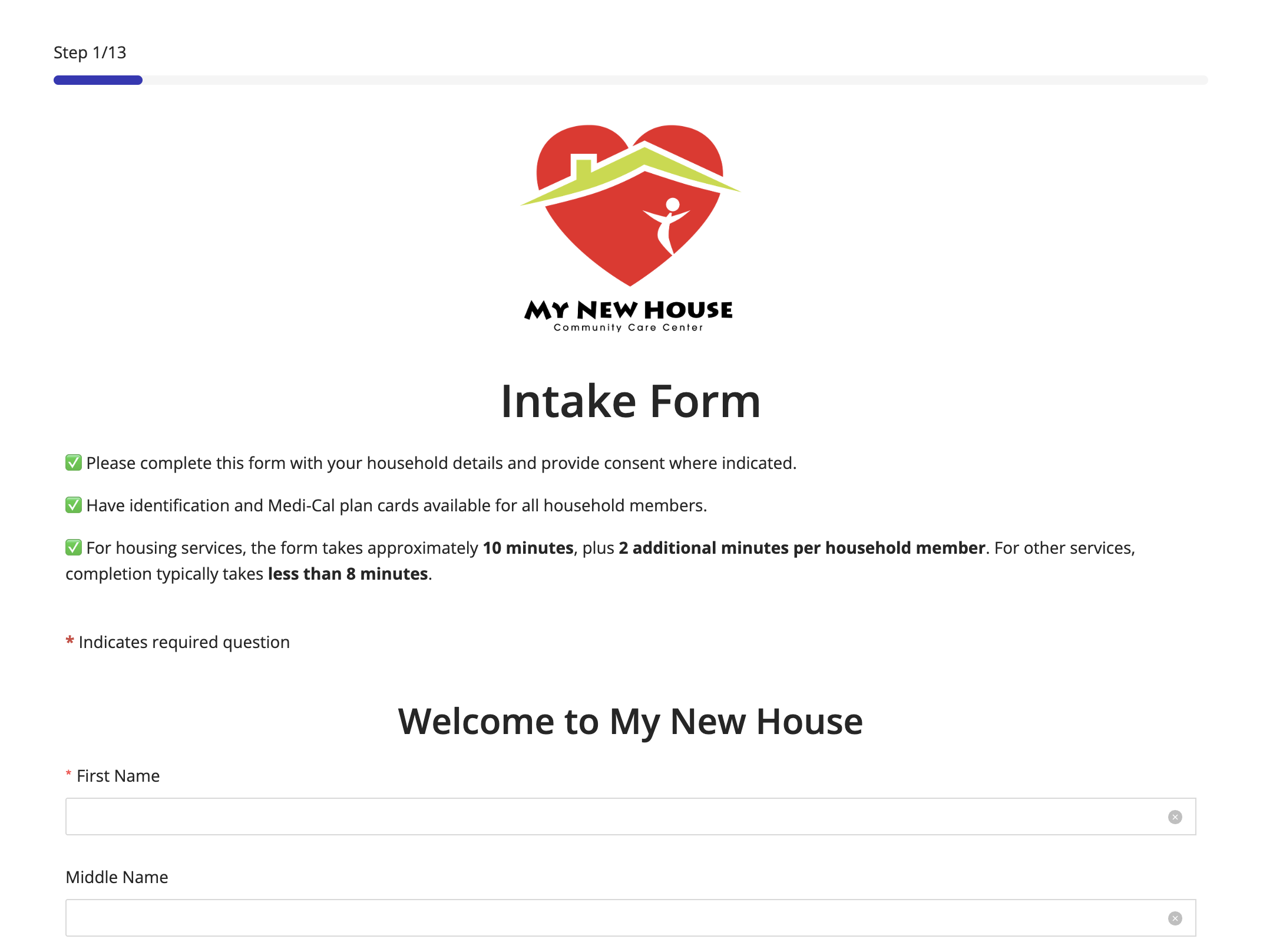
The client is required to complete an intake form, which allows case management to assess needs, determine household composition and income, and identify the services requested.
Admissions (Remote) Responsibilities
Admissions (Remote) will:
Create the client case and add all household members in Casebook
Upload identification, medical documents, and the Intake Form (PDF) to Casebook
Email the completed Intake Form and client case email to the case manager
Provide both the client and the case manager with access to the virtual meeting link
Please note: Admissions (Remote) will send the Intake Form and provide access to the virtual meeting link only after the completed Intake Form has been received from the client.

❋
*
❋ *
The Day of the Virtual Meeting
Case Manager Preparation

The case manager reviews the Intake Form to become familiar with the client’s information and service needs.
The case manager must also ensure internet connectivity is stable, systems are functioning properly, and all necessary tools and documents are ready prior to the virtual meeting.
Case Manager Introduction

The case manager prepares brief talking points to welcome the client, introduce themselves, and provide an overview of My New House, including the structure of the appointment.
Example structure:
“Welcome to My New House. It is a pleasure to assist you today. We are a nonprofit organization that supports individuals and families with housing, healthcare, food assistance, and other community resources. Our appointment today will last approximately 45 minutes. During this time, I will review your intake form, ask a few questions to better understand your situation, and provide you with the appropriate resources and application links for you to complete at your convenience. To begin, can you share what brought you to seek our services?”
Client Care Support Documentation (CCS Form)
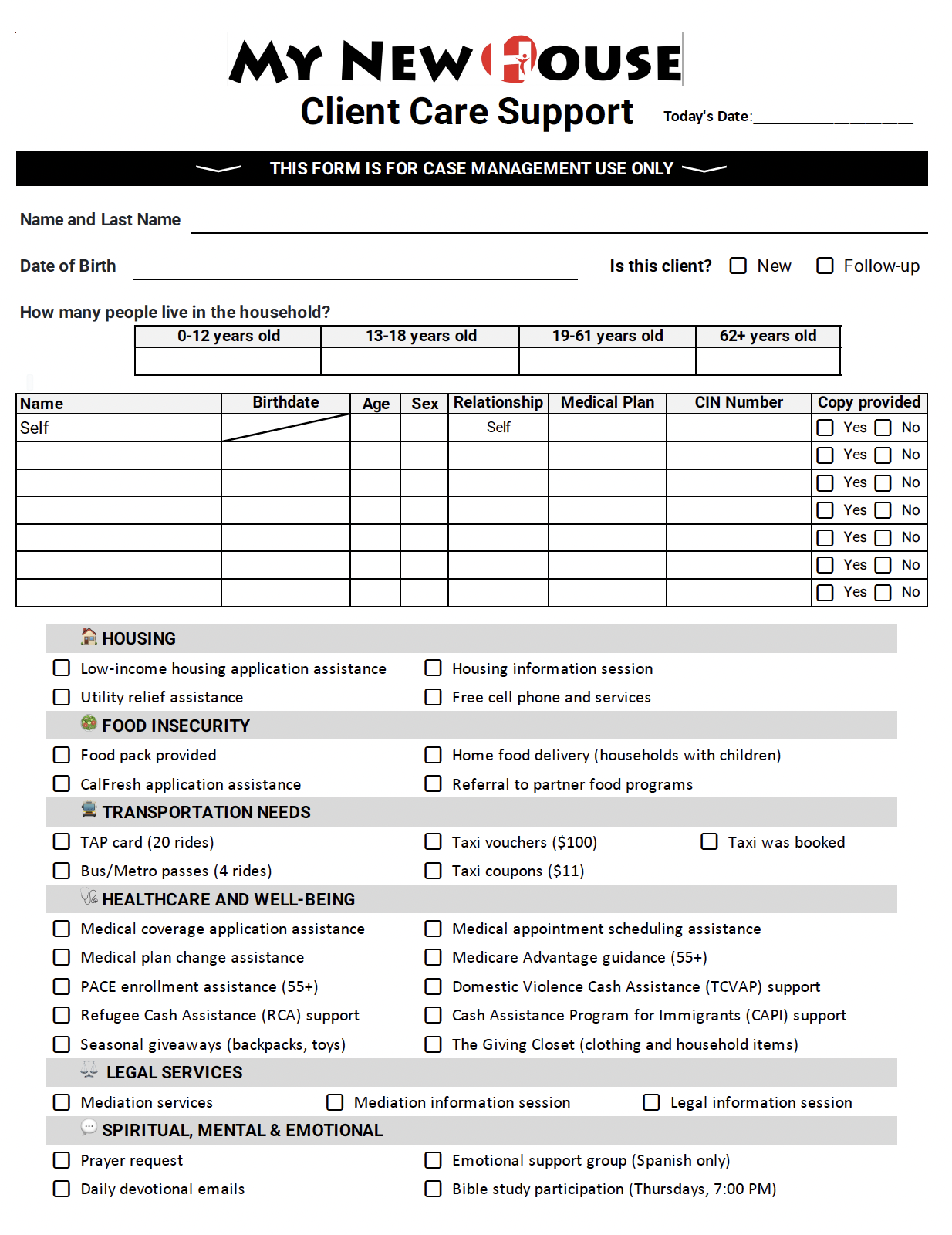
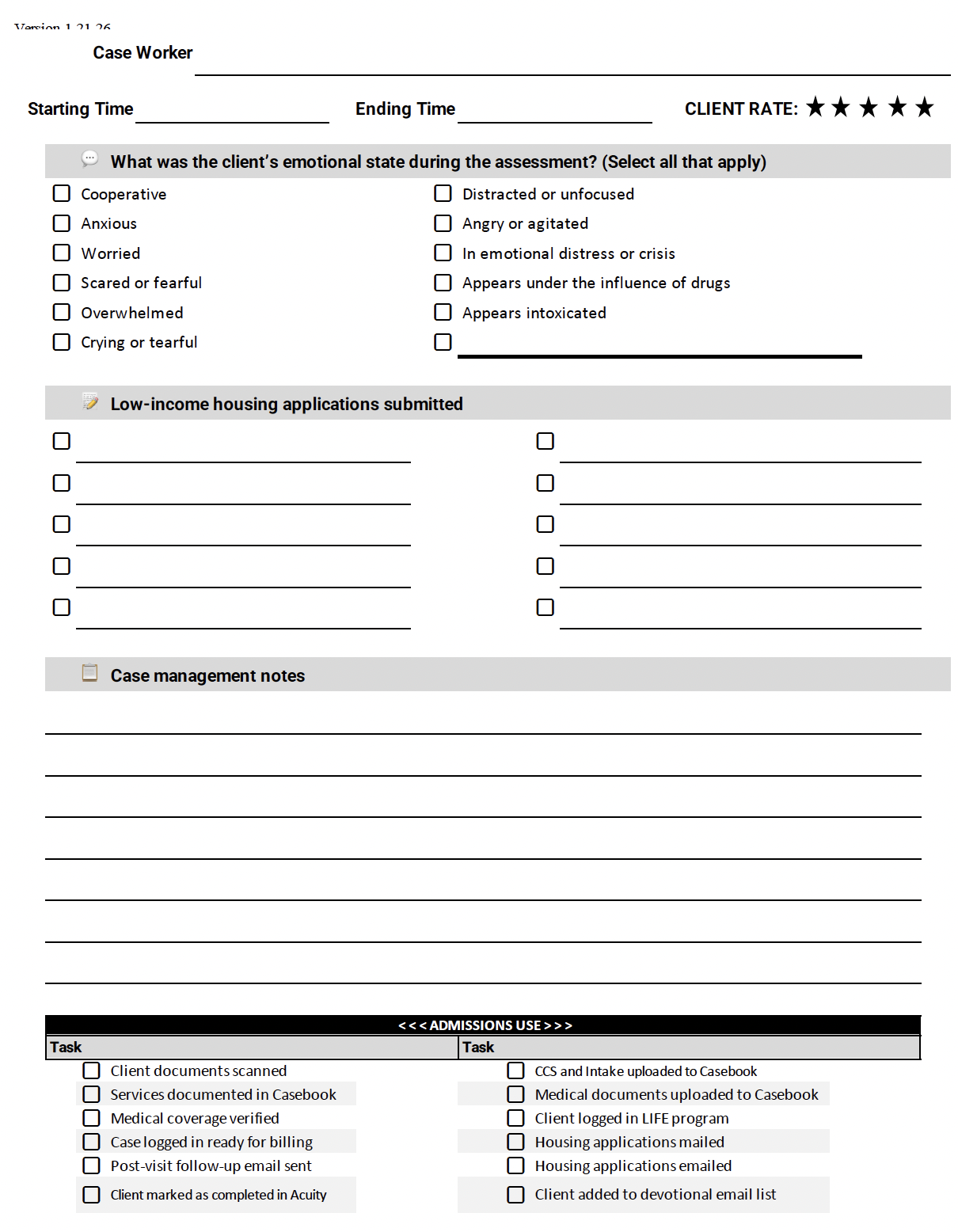
The Client Care Support Form (CCS) is an internal document used by case managers to develop and document the client’s case. This form includes the services available through My New House, the client’s emotional presentation at the time of the appointment, a client assessment rating, detailed case notes, and follow-up plans or next steps. It must be completed accurately to ensure proper documentation and continuity of care.
There are two ways to complete and submit this form:
Complete the form online.
Print the PDF form, complete it, scan it, and email it to caseworker1@mynewhousela.org after the meeting along with other documents related to this case.
We recommend case manager to have this form open while assessing the client.

❋
*
❋ *
Walkthrough for Services Provided Virtually
If you determine that a client may benefit from mediation services, provide information about the program and explain how it works. If the client does not request to proceed, do not send the mediation request link.
If a client requests mediation, provide them with the official link to submit a mediation request.
Low-Income Housing Application Session and Assistance
Mediation Session and and Assistance
Utility Relief Assistance

General Steps:
-Reach out to Liseth Cornejo at (818)-572-0682 (8AM-4PM) or lcornejo@iilosangeles.org, explain who you are and who the client is, explain the client’s circumstances and reasons for needing utility relief, and attach the two most recent utility bills.
-If Liseth is busy and doesn’t respond in a timely manner, call the Incoming Call List at (818)-244-2550 and put the client on their call back list, where a case manager from IILA will call the client back directly and ask them about their circumstances as well as for the two most recent utility bills.
-Keep in mind that IILA will not help with any LADWP bills period, but will instead help with others such as Edison and SoCal Gas.
-
Request copies of the two (2) most recent utility bills.
Documentation Requirements:
Bills must be fully scanned in PDF format.
No photos, screenshots, or incomplete pages will be accepted.
All pages of each statement must be included.
If the client does not have the bills available during the meeting:
Instruct them to email the complete scanned copies to you at a later time.
Must submit another CCS form when documentation is received.
Clearly communicate that processing cannot move forward without full documentation.
After your meeting:
Upload and attach the bills to the CCS form.
Zuzu or designated office staff will process the submission and referral.
-
Clearly inform the client that:
We will assess their situation and refer them to the appropriate utility assistance program based on eligibility and level of need.
Approval is not guaranteed and depends on program criteria.
Important clarification regarding DWP assistance:
DWP emergency programs assist life-threatening cases only.
Examples include clients who rely on:
A ventilator
Oxygen support at home
Other medically necessary electrical equipment
In qualifying emergency cases:
The program may cover the entire outstanding balance.
They may also assist with payment stabilization.
Avoid promising approval. Focus on evaluation and documentation accuracy.
-
In the CCS notes section, include a clear and compelling hardship narrative explaining why the client fell behind.
Your documentation should:
Identify the root cause (job loss, medical emergency, fixed income, family crisis, disability, etc.).
Provide a brief timeline.
Explain why the balance accumulated.
Highlight any medical or household risk if service is disconnected.
This strengthens referrals and partner review decisions.
-
If the client owes money for:
Internet
Cell phone
Landline
Offer referral to a free cell phone assistance program.
Explain that this may:
Eliminate or reduce communication expenses
Restore access to essential services
Support housing follow-ups, medical coordination, and employment opportunities
Document whether the client accepts or declines the referral.
Compliance Reminder
✔ Do not accept incomplete documentation.
✔ Do not promise approval.
✔ Attach bills before submitting CCS.
✔ Ensure the client understands next steps and required follow-up (including emailing documents if missing).
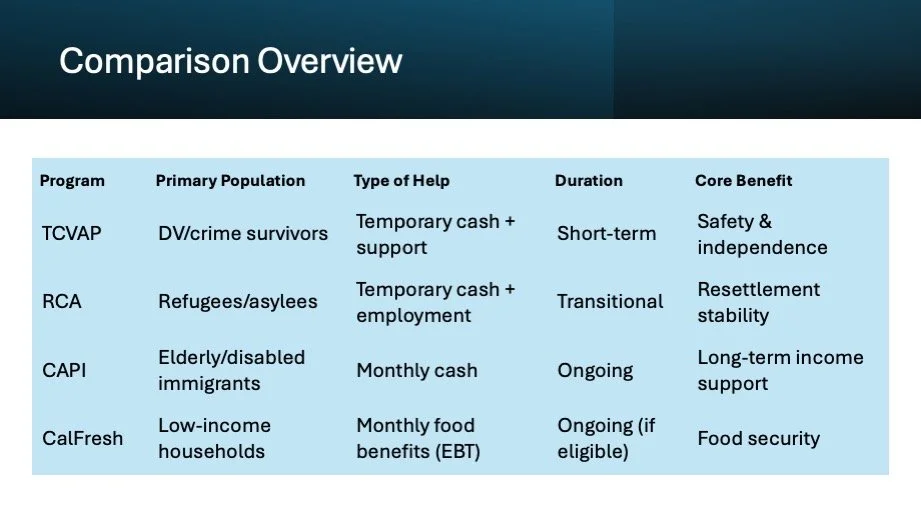
Cash & Food Assistance Programs
(DPSS/BenefitsCal)
Home Food Delivery:
This program supports families in Los Angeles County by providing food packs for children when available. Families may sign up using the form below to be considered for home delivery.
Food pack contents may vary based on availability and volunteer support. When a volunteer is available in your area, contact will be made using your preferred method.
Thank you for your interest in supporting your children’s nutritional needs.
Medical Coverage Application Assistance: BenefitsCal
Refugee Cash Assistance (RCA) support: BenefitsCal
Domestic Violence Cash Assistance (TCVAP) support: BenefitsCal
Cash Assistance Program for Immigrants (CAPI) support: BenefitsCal
-
(Trafficking and Crime Victims Assistance Program – includes many survivors of domestic violence and qualifying crimes)
What This Is
TCVAP provides temporary cash benefits to survivors of:
Domestic violence
Human trafficking
Other qualifying serious crimes
It is often used when individuals cannot safely access traditional benefits due to immigration status or safety concerns.
Who Benefits
Survivors fleeing abusive households
Individuals applying for U-Visa, T-Visa, or VAWA relief
Immigrants who are victims of qualifying crimes
Individuals without access to CalWORKs or SSI
How Assistance Is Provided
Monthly cash assistance
Access to CalFresh (if eligible)
How It Benefits Clients
Provides financial independence from the abuser
Supports relocation and emergency housing
Covers basic needs (rent, food, utilities)
Reduces immediate economic vulnerability
-
What This Is
RCA is federally funded temporary cash assistance for newly arrived humanitarian entrants who do not qualify for CalWORKs.
Who Benefits
Refugees
Asylees
Cuban/Haitian entrants
Special Immigrant Visa holders
Certain humanitarian parolees
Usually available during the initial resettlement period.
How Assistance Is Provided
Monthly cash benefits
Employment and job placement services
How It Benefits Clients
Stabilizes households during resettlement
Prevents homelessness
Encourages employment and self-sufficiency
Covers essential living expenses
-
What This Is
CAPI provides state-funded cash assistance to elderly, blind, or disabled immigrants who are ineligible for federal SSI solely due to immigration status.
Who Benefits
Lawfully present non-citizens
Age 65+ OR blind/disabled
Individuals meeting income/resource limits
Those denied SSI due to immigration restrictions
How Assistance Is Provided
Monthly cash payments (similar to SSI rates)
Ongoing support while eligibility continues
How It Benefits Clients
Prevents extreme poverty
Supports rent and utility payments
Assists with medication and healthcare expenses
Promotes housing stability
CAPI is essentially an SSI-equivalent safety net for qualifying immigrants.
-
What This Is
CalFresh is California’s Supplemental Nutrition Assistance Program (SNAP). It provides monthly food benefits through an EBT (Electronic Benefit Transfer) card.
Who Benefits
Low-income individuals and families
Seniors
Disabled individuals
Working households with limited income
Certain immigrants and refugees
Eligibility depends on income, household size, and immigration status.
How Assistance Is Provided
Monthly food benefits loaded onto an EBT card
Card functions like a debit card for groceries
Can be used at grocery stores, markets, and some farmers markets
How It Benefits Clients
Reduces food insecurity
Frees up income for rent and utilities
Improves nutritional stability
Supports children, seniors, and medically vulnerable individuals
CalFresh does not provide cash for bills — it is strictly for food purchases — but it significantly improves overall financial
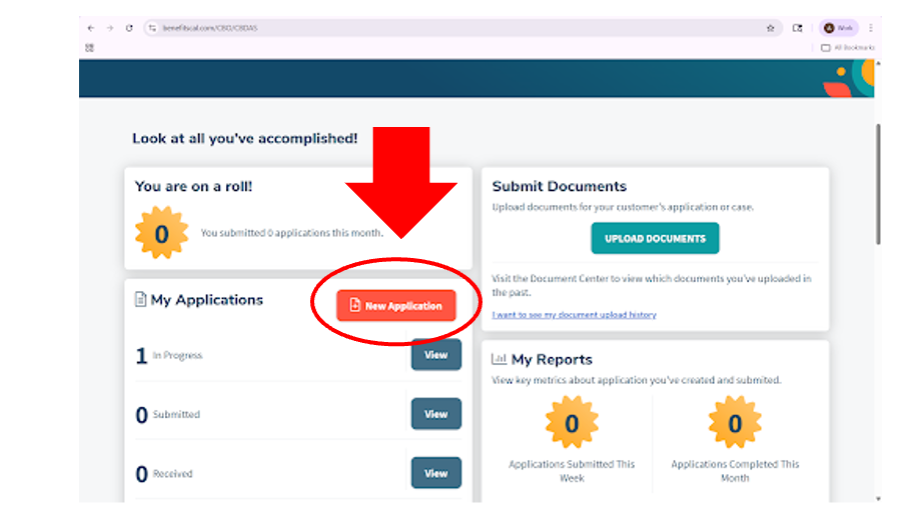
After logging In to BenefitsCal, click on the “New Application” button as seen below to start a new application. Afterwards, it will line up with the video, starting at 0:32 seconds.
WATCH the video tutorial of how to navigate BenefitsCal
Assist the client in completing the application through the BenefitsCal website. Ensure all required sections are accurately completed and review eligibility criteria before submission.
Required documents may include:
Valid photo identification
Social Security Number or ITIN
Proof of income (recent pay stubs, unemployment benefits, SSI, etc.)
Proof of address (utility bill, lease agreement, or official mail)
Medical Plan Change
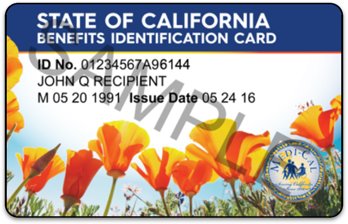
Medical Plan Change: DHCS (https://www.healthcareoptions.dhcs.ca.gov/en/online) > Login > Make Changes
Senior Health Coverage Support (55+)
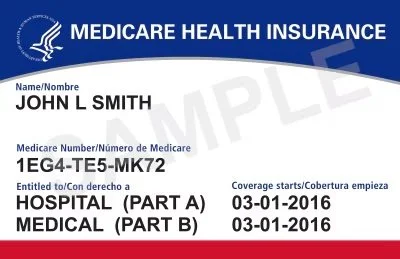
-PACE Enrollment: Email Sara Larrazabal at renata@mynewhousela.org saying that we have a client that wants to do PACE Enrollment. All you need to provide for Renata in this email is the contact information for the client, and Renata will contact the client for additional information.
Medicare Advantage Guidance: Email Sara Larrazabal at renata@mynewhousela.org saying that we have a client that wants to do Medicare Advantage Guidance. All you need to provide for Renata in this email is the contact information for the client, and Renata will contact the client for additional information.
-
(Note: Medicare eligibility typically begins at 65, or earlier if disabled. Some 55+ clients may be preparing for enrollment or already eligible due to disability.)
What This Is
Medicare Advantage (Part C) plans are private health plans that replace Original Medicare (Part A & B). These plans often bundle additional benefits not included in traditional Medicare.
Guidance means we help clients:
Compare plan options
Understand benefits
Review provider networks
Evaluate costs
Make informed enrollment decisions
Who Benefits
Adults 65+
Adults under 65 with qualifying disability
Individuals with chronic conditions
Dual-eligible clients (Medicare + Medi-Cal)
Seniors overwhelmed by plan options
How It Benefits Clients
Medicare Advantage plans may include:
Prescription drug coverage
Dental services
Vision exams and eyewear
Hearing aids
Transportation to medical appointments
Gym memberships (e.g., SilverSneakers-type programs)
Over-the-counter (OTC) benefit cards
Care coordination
Impact on Clients:
Lower out-of-pocket costs
Simplified coverage under one plan
Access to extra services not covered by Original Medicare
Improved chronic disease management
Reduced transportation barriers
For many seniors, the added benefits significantly reduce medical and household expenses.
-
(Program of All-Inclusive Care for the Elderly)
What This Is
PACE is a comprehensive medical and social services program for older adults who qualify for nursing-home-level care but wish to remain living safely in their homes.
It integrates medical care, long-term care, and supportive services into one coordinated program.
Who Benefits
Adults 55+
Individuals with chronic or complex medical conditions
Seniors who qualify for nursing-home-level care
Dual-eligible (Medicare & Medi-Cal) participants
Seniors at risk of institutionalization
How Assistance Is Provided
PACE delivers services through an interdisciplinary care team, which may include:
Primary care physicians
Nurses
Social workers
Physical therapists
Nutritionists
Transportation coordinators
Services may include:
Primary and specialty medical care
Adult day health center services
Prescription medications
Physical therapy
Home health services
Transportation to appointments
Meals and nutritional support
Durable medical equipment
Hospital and long-term care coverage
How It Benefits Clients
PACE is designed to:
Prevent nursing home placement
Coordinate all medical care under one system
Reduce hospitalizations
Provide daily supervision and monitoring
Support aging in place
Impact on Clients:
Increased safety at home
Comprehensive medical oversight
Transportation provided automatically
No fragmented care
Reduced caregiver stress
Improved quality of life
For medically fragile seniors, PACE provides full-spectrum care while preserving independence.
If a client requests enrollment assistance or information regarding Medicare or specialized senior health programs, the case manager must write this request on CCS form. We will refer the client to Renata, our Medical and Medicare Specialist

❋
*
❋ *
In-Person Services
The following services are not available through virtual appointments. Clients must schedule an in-person appointment through our website under the Appointments section.
Services requiring an in-person visit include:
Free cell phone and related services
Free cell phone and services: Website (mynewhousela.org) > Appointments > Events > Free Cell Phone Appointment Calendar
The Giving Closet (free or low-cost clothing and household items)
Website (mynewhousela.org) > Appointments > Events > The Giving Closet appointment calendar
Transportation
If taxi was booked: We can not only give the client a taxi voucher, but also we can call the taxi for them. If we called the taxi for them, check this box on the CCS Form
Paper housing applications
You must schedule clients for an in-person appointment for assistance completing paper housing applications

❋
*
❋ *
Post-Appointment Responsibilities
Client Care Support Form Submission

The case manager must complete and submit the Client Care Support (CCS) form, copying the client case email. Ensure all notes are finalized and that every property link provided to the client is clearly documented.
Case Management Notes:
Client Information – Name and emotional state during the visit.
Reason for Visit – Presenting concern and requested services.
Assessment – Key needs identified (housing, income, medical, household status).
Services Provided – Applications completed, referrals given, resources shared.
Follow-Up Plan – Next steps for client and case manager.
Example of a case management note:
It was a pleasure to help Juan who shared that he is worried because he cannot find affordable housing for his family. He works full time but is currently sleeping in his car, while his wife and children are staying at a friend’s home. He came to request help with housing, a medical plan change, and mediation services.
I provided him with the SYZ low-income housing link to apply, changed his medical plan to LA Care, and gave him the link to request mediation.
At this time, no follow-up appointment is needed unless he contacts us again for additional housing support or other services.
Follow-up email to client

Send a follow-up email to the client, copying caseworker1@mynewhousela.org and the client case email. Include pleasantries, all links, resources, and information discussed during the appointment, and thank the client for the opportunity to assist them.

❋
*
❋ *
Virtual Case Management Meeting Guidelines
-
Allow the client a maximum of 5 minutes after the scheduled start time. If the client does not join, attempt to contact them by calling (you may block your number if needed) or send a follow-up email.
-
If the client begins to cry, allow them a moment to express their emotions. After giving them sufficient time, gently guide the conversation back to the purpose of the meeting.
-
Maintain professionalism at all times. If the client becomes verbally aggressive or inappropriate, calmly end the meeting and document the incident. Notify the team by email immediately.
-
If you encounter a challenging situation or are unsure how to proceed, contact:
Aryan for housing,
Jamesha for case management,
Gaby for transportation,
Zuzu for mediation and utility relief, and
Zorayda for guidance or general questions.
Additional Best Practices:
Ensure your camera, audio, and internet connection are working before the meeting.
Conduct meetings in a quiet, professional environment.
Document all interactions immediately after the session.
Do not promise outcomes—only provide guidance and available resources.
Protect client confidentiality at all times.
Stay within the scheduled 45-minute timeframe.
My New House Platforms.
-
![]()
Hipaatizer
DIGITAL FORMS DESIGNER
Hipaatizer is a HIPAA-compliant online platform that enables healthcare providers and related professionals to create, manage, and embed secure digital forms and documents without coding. It offers a drag-and-drop form builder, conversion of existing PDF/Word forms into HIPAA-compliant formats, two-factor authentication, encrypted data storage, e-signatures, and integration options with EMRs/CRMs—helping organizations safely collect and transmit protected health information (PHI) while maintaining regulatory compliance -
![]()
Casebook
CASE DOCUMENTATION
Casebook Case Management is a configurable, HIPAA-compliant human services software platform that helps organizations centralize and streamline client care, case tracking, documentation, collaboration, and reporting in one secure system. It supports nonprofits, social service providers, and public agencies with intake, case notes, analytics, workflow automation, and custom reporting—enabling teams to manage data, monitor outcomes, and improve service delivery from any device. -
![]()
Pear Suite
BILLING & CLAIMS
Pear Suite is designed to empower Community Health Workers (CHWs), community-based organizations, and health plans with tools for care navigation, documentation, claims management, and billing reimbursement—all in one system. It supports care coordination, client communication, workflows, data tracking, and reporting, while enabling teams to address social determinants of health and unlock sustainable funding for community-centered services. -
![]()
Los Angeles Housing Department
AFFORDABLE HOUSING SEARCH
Affordable & Accessible Housing Search (City of Los Angeles) is the online registry provided by the Los Angeles Housing Department (LAHD) that lets residents and housing advocates search for affordable and accessible rental housing units throughout the city, view available properties, and access related information such as pre-applications, grievance procedures, and rent limits. It’s a free tool for renters to find homes that meet accessibility needs and for property owners to list qualifying units.
-
![]()
Los Angeles County Department of Consumer and Business Affairs (DCBA)
MEDIATION
LA County DCBA Connect Portal is an online service platform of the Los Angeles County Department of Consumer and Business Affairs (DCBA) that lets residents register or sign in to access consumer and worker support services such as filing complaints, requesting mediation, accessing the rent registry, foreclosure prevention, and reporting issues like price gouging. It provides a centralized dashboard to submit service requests and connect with DCBA resources and assistance.
-
![]()
California Department of Health Care Services (DHCS)
MEDICAL SEARCH
Health Care Options Online is the California Department of Health Care Services (DHCS) portal that helps Medi-Cal beneficiaries explore and manage their managed care coverage. It lets users review health plan choices in their county, compare benefits, enroll or change plans, find providers, and access consumer-focused information and resources for Medi-Cal managed care programs.
-
![]()
Accuity
SCHEDULING
Acuity (Acuity Scheduling) is a cloud-based appointment scheduling and booking platform that helps service providers automate client scheduling, calendar management, reminders, intake forms, and payments. It allows clients to view real-time availability, self-schedule appointments online, sync with calendars, and receive automated notifications—streamlining booking workflows for businesses, professionals, and health-related services.
-
![]()
NordVPN
INTERNET SECURITY
NordVPN is a virtual private network (VPN) service that secures your internet connection by encrypting data and masking your IP address, protecting your privacy and online activity on any network. It helps users bypass geo-restrictions, prevent tracking, and enhance security on public Wi-Fi, making it useful for personal, travel, and remote work internet protection.
-
![]()
SquareSpace
WEBSITE DESIGN
Squarespace is an all-in-one website building and hosting platform that enables individuals and businesses to create professional websites, portfolios, online stores, and blogs using customizable templates, drag-and-drop design tools, and built-in SEO, analytics, and e-commerce features—without requiring coding skills.