

Low-Income Housing Training
You will assist the client in identifying properties they may qualify for based on income, household size, preferences, and eligibility criteria.
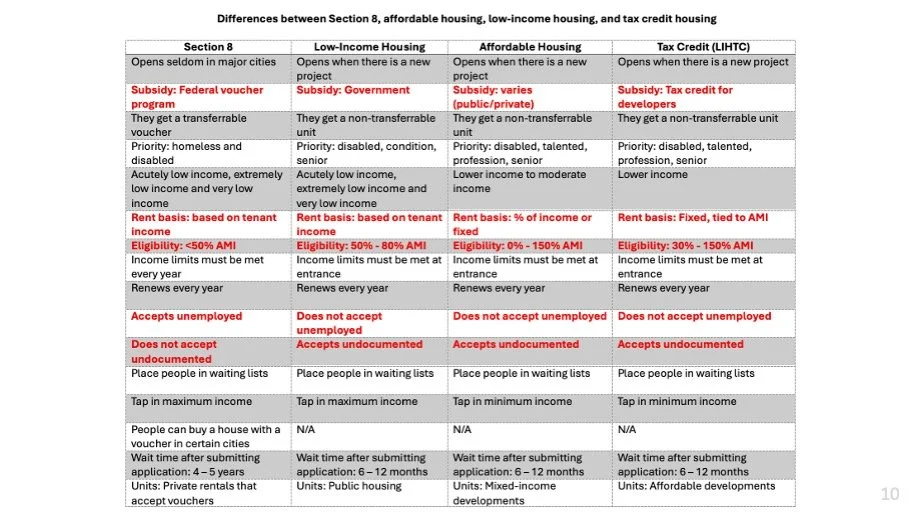
If suitable housing options are not available at the time of the appointment, provide education on the different types of low-income housing programs. I
Instruct the client to schedule a follow-up appointment the following month when the updated housing list becomes available.
Types of Housing
Housing Database
LAHD Los Angeles Housing Department Database
LAHD Registration and Housing Application Process (My New House Advocates)
Step 1: Register as a My New House Advocate
Before accessing or submitting any applications, you must first register in the LAHD system as a My New House advocate.
Go to: https://lahousing.lacity.org/AAHR/ComCon/Tab/RenderTab?tabName=Home
Complete the registration process
When prompted to select an organization, be sure to choose My New House
Wait for confirmation/approval if required before proceeding
Step 2: Log In and Add Client
Once your account is active:
Log into the LAHD portal
Click on “My Dashboard” in the top left corner
Click on the blue button that says “Add Client”
Enter the client’s relevant information as requested, then click “Add”.
If the website says the client already exists, try a different email address and/or phone number.
If the client doesn’t have or want to use different contact info, you can instead give the client a list of the properties for them to apply for themselves after they leave.
Step 3: Navigate to Waitlist Applications
After entering the housing search section:
On the main dashboard, locate and click the large orange button labeled:
“Begin Your Search For Housing”Scroll down to locate the Waitlist Applications section
You should typically see a list of approximately 30 available properties
This list represents current housing opportunities accepting pre-applications
Step 4: Select a Property and Start the Application
Click on the property you would like to apply for
Review the property details carefully (eligibility, income limits, unit type, etc.)
On the right-hand side of the screen, locate and click:
“Start Pre-Application”
Important Notes:
If a property does not appear on the waitlist, it may be temporarily closed and not accepting applications at that time
If you open a property and the “Start Pre-Application” button is unavailable, this typically means the waitlist is currently closed
Even if some properties are not visible or accessible, most properties listed in our internal My New House database remain active, so always cross-reference when needed
Best Practice:
Always verify eligibility requirements and documentation before starting an application to avoid incomplete or rejected submissions.